CSV: I look for a title column and an optional website column (case-insensitive).
2 Editorial plan (you can edit the scenes and CTA before generating)
3 Creatives
Typos are caught and regenerated automatically. Regen redoes a variant instantly. ⬇ saves a single image. Images still failing after auto-retries keep a _Fail suffix in the ZIP.
🔄 Face Swap — put the person you want into an existing photo · Ideogram, $0.06 / image
Example: original creative (left) + the person you want (circle) → same creative with that person (right). Click to zoom.
1Original photothe image you want to edit — its person gets replacedclick or drag & drop
➜
2New persona clear photo of the person to put into image 1click or drag & drop
The head in image 1 is detected automatically — only that area is regenerated, the rest of the image (text, buttons, background) stays untouched.
🖼 Saved swaps — every result is stored here automatically, from any computer. Deleted only when you hit 🗑.
🗂 History — every generated image is saved automatically to cloud storage
⚠ Text check gave up
These images still have text errors after all automatic regenerations. They are flagged red in the gallery (and get a _Fail suffix) — hit Regen on them to try again, or switch the model to Ideogram for those titles.
👋 Welcome to Flaviu-CreativeAI
Turn article titles into ready-to-send newsletter creatives — image, headline and button included. Here's all you need to know:
1️⃣
Set up your run (all in step 1): pick the mode, the Model, how many Variants per title you want (each gets a different visual concept), and a batch name — that's the folder your files land in.
⚡
Instant vs Batch — the two cards at the top: ⚡ Instant — images in seconds, full price. 🕐 Batch — ~50% cheaper, but Google queues it: anywhere from 3 minutes to ~2 hours depending on how busy their servers are. The exact price per image shows on each card and updates with the model you pick. The default model is GPT Image 2.5 Flare (OpenAI, ≈ $0.01 / image, Instant only, ~20 s per image with 10 generated at a time — about 60 images in 2-3 minutes). Batch is Google models only — pick a Nano Banana model to use it; Ideogram and OpenAI always run Instant.
2️⃣
Paste your titles (one per line) or upload a .txt/.csv, then hit Plan the scenes. The AI proposes the visuals and button text for each title — you can edit anything before generating.
🕐
Batch jobs run in the background — you can close the page and come back later, from any computer. Pending jobs are listed at the top with a live status: ⏳ Not finished yet or ✔ Done — hit Resume to load the results. You can run several batches in parallel and start a fresh one anytime with + Start new batch.
🛟
Ideogram fallback — if Google or OpenAI refuses a title (politicians, public figures...), the app automatically retries with Ideogram. Leave it on.
🔍
Auto text check — after each image, an AI proofreader reads it and checks the headline and button for typos, duplicated words or stray text. If a problem is found, the image is regenerated automatically (up to 7 retries). Anything still bad after that is flagged red, gets a _Fail suffix in the ZIP, and you get a popup telling you which title gave up.
✅
Review & download — zoom each image, Regen anything you don't like, save a single image with ⬇ (opens Save as...), or grab everything with Download ZIP.
☁️
Everything is auto-saved to the cloud (look for the ☁ on each image). Open 🗂 History to browse any past batch from any computer — click a batch to expand it, re-download its ZIP anytime, or 🗑 delete it to free up space.
🔄
Face Swap — its own tab in the top bar: upload a photo + a picture of a person, and Ideogram redraws the photo with that person in it. The instruction is editable, and every result is kept in the Saved swaps gallery at the bottom of the tab (visible from any computer) until you delete it with 🗑.
Reopen this guide anytime with the ? button in the top bar.
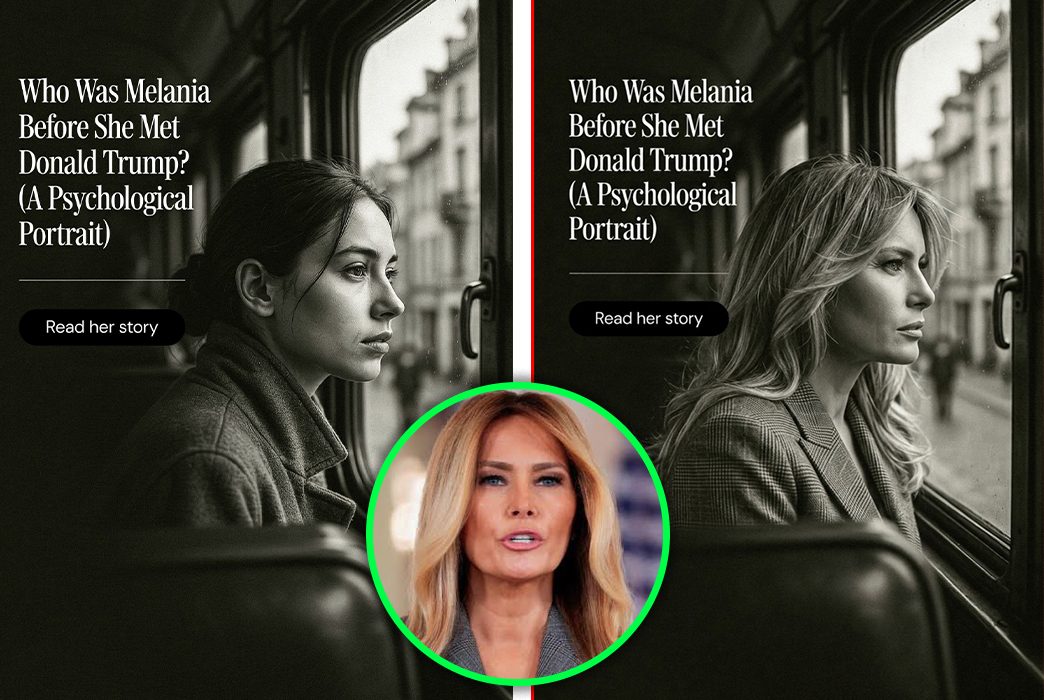 Example: original creative (left) + the person you want (circle) → same creative with that person (right). Click to zoom.